

Here's a relatively simple feature request. Could DE include an option to rename the Recycle bin folder when saving it out so as to prevent Windows from getting the corrupt recycle bin errors? I notice other software such as R-Studio will rename it slightly so Windows doesn't confuse it for the system recycle bin. Perhaps even an option where all of the system metadata files starting with $ are renamed using a different special character that Windows won't try to interact with.
I'm always getting customers calling back because they are confused by the error about a corrupt recycle bin. I've also seen strange things on occasion, such as a $Bitmap file (which I simply forgot to uncheck) getting recovered and overwriting the destination's own $Bitmap file and causing it to show as nearly full when it isn't. I think just replacing the $ with a %,# or some other character would resolve all that.
Feature request
Moderator: Nick_TS
-
DataMedics
- Advanced user
- Posts: 619
- Joined: 14.12.15
- Reputation: 18 / (177)

Re: Feature request
I think a good feature would be the ability of skipping files/sectors when doing a Map of folders for later mark and imaging.
I don't like the idea of being "hammering" the drive trying to read sectors just when I want to map the files and folders...
I don't like the idea of being "hammering" the drive trying to read sectors just when I want to map the files and folders...
Re: Feature request
Hi
It would be nice, after we close a task, and resume it later, if DE get back all the steps of the Status back again. I have been asked for 1 client for how long I was working on is case, and because I had resumed the task to get parts, the previous work didn't showed up.
Thanks
It would be nice, after we close a task, and resume it later, if DE get back all the steps of the Status back again. I have been asked for 1 client for how long I was working on is case, and because I had resumed the task to get parts, the previous work didn't showed up.
Thanks
Re: Feature request
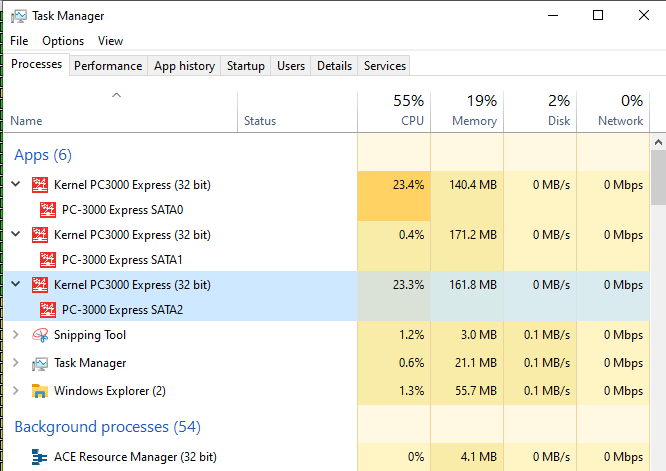
Once in a while, a project will lock up completely and require ctrl-alt-del Task manager - stop the PC-3000 task. When multiple pc3000 task instances are running at the same time, I see no way to discern SATA0's task from SATA1, SATA2, SATA3, for instance.
Would be nice, if possible, to have them labeled by port number in the individual task labels so the the correct task could be closed (without guessing and potentially closing a different, working active task). It's possible I'm missing something, but it always seems to be my last guess
Would be nice, if possible, to have them labeled by port number in the individual task labels so the the correct task could be closed (without guessing and potentially closing a different, working active task). It's possible I'm missing something, but it always seems to be my last guess

Re: Feature request
ThomasH wrote:Source of the post Once in a while, a project will lock up completely and require ctrl-alt-del Task manager - stop the PC-3000 task. When multiple pc3000 task instances are running at the same time, I see no way to discern SATA0's task from SATA1, SATA2, SATA3, for instance.
Would be nice, if possible, to have them labeled by port number in the individual task labels so the the correct task could be closed (without guessing and potentially closing a different, working active task). It's possible I'm missing something, but it always seems to be my last guess
Hi Thomas, not sure what version of Windows you use, but in Win10 you can expand the apps under processes and see the port numbers.
Re: Feature request
@ Blizzard - Ugh... well, that's a little embarrassing that I didn't think to check the down arrow. I think I'm getting old. Thanks.
-
digitalsupport

- User
- Posts: 261
- Joined: 30.12.11
- Reputation: 7 / (72)
Re: Feature request
When opening a task in DE without a DE port selected, I miss "Work with copy only" in opening dialog In latest version 7.0.26
Update - working in latest 7.0.27.10305
Update - working in latest 7.0.27.10305
-
crashpcberlin

- Newbie
- Posts: 10
- Joined: 11.08.16
- Reputation: 0 / (3)
Re: Feature request
1. During our Diagnose, and after the physically drive check and backing up the Firmware, we usually check the the accessibility of the filesystem and the data. So we mounting the drive read only via PC3K Windisk.
So it would be really cool for the usability if you could integrate the "disk mount utility" link or even better a direct button to mounte the drive via read only in every single utility:
2. Please integrate a "Exit all" Button in a Task to close all windows, tabs, etc, automatically and close a Task or even the PC3K Application in one (or2) clicks.
So it would be really cool for the usability if you could integrate the "disk mount utility" link or even better a direct button to mounte the drive via read only in every single utility:
- Screenshot 2024-02-09 171206.png (9.83 KiB) Viewed 364254 times
2. Please integrate a "Exit all" Button in a Task to close all windows, tabs, etc, automatically and close a Task or even the PC3K Application in one (or2) clicks.
Re: Feature request
Hi
It would be good to have a pop-up message, after creating translator on SSD drives, that asks to save it to file or not. I sometimes forget to save and some of them takes several big minutes to create.
Thanks
It would be good to have a pop-up message, after creating translator on SSD drives, that asks to save it to file or not. I sometimes forget to save and some of them takes several big minutes to create.
Thanks
Re: Feature request
Catastrophic Failure Check: When you click the save button on the PC-3000 portable software (blue icon) to save the report a Catastrophic Failure messages comes. Will be help full to have a log of errors to find out why this is happening. (an example has been attached)
- Attachments
-
- pc3000.png (11.02 KiB) Viewed 190767 times
Re: Feature request
I think it's been requested before, but now that Rstudio has implemented this, it seems within reach, and it would be awesome if DE was able to:
1) Save a files list of a selection as an html file instead of txt/csv. Then, if that file was able to be sent to a customer with very specific files needed on an unstable drive, such that they could open the file-list, select the most-important files and send the list back where we could import their selection to DE and make the first pass on that selected data.
If the files could be shown as good vs bad, or as good vs !Problem folder, that would be great too, for cases where progress is made in layers.
That would be, by far, my favorite addition to DE if possible, and it would lead more-strategic selective recoveries on unstable drives, while allowing some customer participation to save us time ( at least potentially ) too.
2) Less important but still nice, would be a % calculation of good vs bad sectors as a percent of the total sectors attempted to have been read so far. I do the calculation to relay the % of sector-level success to customers very frequently, but it seems like it might be something not extremely hard to implement on the 'Stats' page. IE: after cloning a selection of data I add up the good, bad, ready fail, and skipped sectors and divide the good by the total attempted, to tell customers that at a sector-level the selection is 99.6% perfect, for instance.
3) Not sure if this would really be possible or not, but the ability for HFS+ to Scan Catalog File but excluding the \backups.backupdb\ folder would be nice, for drives with Time Machine backups, which usually kind of ruins or slows down signficantly how that works otherwise.
1) Save a files list of a selection as an html file instead of txt/csv. Then, if that file was able to be sent to a customer with very specific files needed on an unstable drive, such that they could open the file-list, select the most-important files and send the list back where we could import their selection to DE and make the first pass on that selected data.
If the files could be shown as good vs bad, or as good vs !Problem folder, that would be great too, for cases where progress is made in layers.
That would be, by far, my favorite addition to DE if possible, and it would lead more-strategic selective recoveries on unstable drives, while allowing some customer participation to save us time ( at least potentially
) too.2) Less important but still nice, would be a % calculation of good vs bad sectors as a percent of the total sectors attempted to have been read so far. I do the calculation to relay the % of sector-level success to customers very frequently, but it seems like it might be something not extremely hard to implement on the 'Stats' page. IE: after cloning a selection of data I add up the good, bad, ready fail, and skipped sectors and divide the good by the total attempted, to tell customers that at a sector-level the selection is 99.6% perfect, for instance.
3) Not sure if this would really be possible or not, but the ability for HFS+ to Scan Catalog File but excluding the \backups.backupdb\ folder would be nice, for drives with Time Machine backups, which usually kind of ruins or slows down signficantly how that works otherwise.
Re: Feature request
ThomasH wrote:Source of the post I think it's been requested before, but now that Rstudio has implemented this, it seems within reach, and it would be awesome if DE was able to:
1) Save a files list of a selection as an html file instead of txt/csv. Then, if that file was able to be sent to a customer with very specific files needed on an unstable drive, such that they could open the file-list, select the most-important files and send the list back where we could import their selection to DE and make the first pass on that selected data.
If the files could be shown as good vs bad, or as good vs !Problem folder, that would be great too, for cases where progress is made in layers.
That would be, by far, my favorite addition to DE if possible, and it would lead more-strategic selective recoveries on unstable drives, while allowing some customer participation to save us time ( at least potentially
2) Less important but still nice, would be a % calculation of good vs bad sectors as a percent of the total sectors attempted to have been read so far. I do the calculation to relay the % of sector-level success to customers very frequently, but it seems like it might be something not extremely hard to implement on the 'Stats' page. IE: after cloning a selection of data I add up the good, bad, ready fail, and skipped sectors and divide the good by the total attempted, to tell customers that at a sector-level the selection is 99.6% perfect, for instance.
3) Not sure if this would really be possible or not, but the ability for HFS+ to Scan Catalog File but excluding the \backups.backupdb\ folder would be nice, for drives with Time Machine backups, which usually kind of ruins or slows down signficantly how that works otherwise.
I second that, the first implementation of such thing, from my knowledge is from the Rapidspar Software, but since they are teamed up with R-TT, they improved quite a lot. This is a much easier feature to keep up with the clients Recovery and should ease and prioritise which files or folders.
If you need some samples, let me know.
Who is online
Users browsing this forum: No registered users and 7 guests