
I have a WD20SDRW-11VUUS0 in for recovery, original USB PCB 2060-800067-001, swapped board and ROM for an unlocked SATA PCB from Ace Lab 2060-800065-002.
Drive readies up and have access to service area.
When I enable decryption on sector edit the log has messages saying SED key checking: "Wrong single key size". UA key reads okay and it identifies as Self Encryption SSD v2.
Data still looks encrypted.
I have PC3000 UDMA 6.9.16 with DE 5.12.11
Is this just a case of PC3K being out of date?
Thanks!
Charger Unlocked PCB encryption issues
Moderator: Maxim_TS
-
beefstrudel

- Newbie
- Posts: 14
- Joined: 12.07.23
- Reputation: 0 / (0)

Re: Charger Unlocked PCB encryption issues
You need to read the drive with original PCB.
-
d_d_recovery

- User
- Posts: 202
- Joined: 20.03.19
- Reputation: 4 / (38)
Re: Charger Unlocked PCB encryption issues
Just to expand on what SGdata said. V2 encryption keys are stored in the original USB PCB MCU, so you need to convert the original USB PCB to SATA and use that.
-
beefstrudel
- Newbie
- Posts: 14
- Joined: 12.07.23
- Reputation: 0 / (0)
Re: Charger Unlocked PCB encryption issues
d_d_recovery wrote:Source of the post Just to expand on what SGdata said. V2 encryption keys are stored in the original USB PCB MCU, so you need to convert the original USB PCB to SATA and use that.
Ahh okay. This is my first experience with an unlocked WD PCB. I guess I misunderstood what they're for.
Are these unlocked boards only for SA / Firmware fixes? Thanks for the help. Just trying to understand their use case.
Re: Charger Unlocked PCB encryption issues
There is no point of using them with newer WD. You read ROM with programmer, unlock it in PC3k, upload it to PCB, remove USB connection and solder SATA. For SA access, repair and recovery.
Re: Charger Unlocked PCB encryption issues
And to add a little more (although probably obvious now) if the original MCU is missing or damaged you will not be able to decrypt the data. If the original PCB is just damaged you will have to swap the MCU (Marvell chip) to a compatible PCB. That brings me to a question of my own, since you have to swap the MCU in that case can it be swapped with one on a native compatible SATA pcb instead of one with the USB and doing the bypass procedure? Just curious at this point.
-
gameboybin

- New user
- Posts: 120
- Joined: 09.09.20
- Reputation: 0 / (0)
Re: Charger Unlocked PCB encryption issues
Can anyone provide the soldering USB pcb to SATA of this PCB???
-
gameboybin
- New user
- Posts: 120
- Joined: 09.09.20
- Reputation: 0 / (0)
Re: Charger Unlocked PCB encryption issues
Can the newest version of PC3000 Decrypt this??
-
digitalsupport

- User
- Posts: 261
- Joined: 30.12.11
- Reputation: 7 / (72)
Re: Charger Unlocked PCB encryption issues
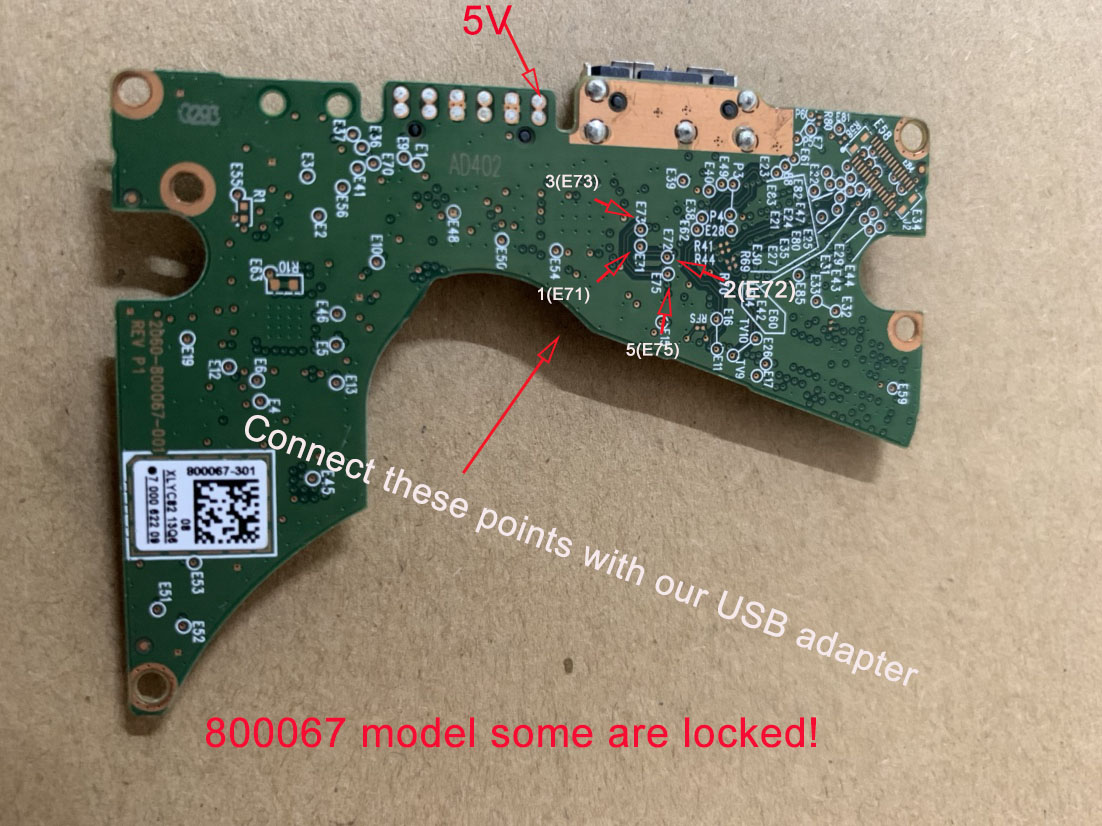
If you mean how to connect SATA connections to 2060-800067-001 USB PCB it´s like all others, usual pins E71, E72, E73 and E75 is even marked.
Remember to remove capacitors in the SATA line. I also recommend to shot USB bridge crystal.
Remember to remove capacitors in the SATA line. I also recommend to shot USB bridge crystal.
- 2060-800067-001.png (1.8 MiB) Viewed 140472 times
-
gameboybin
- New user
- Posts: 120
- Joined: 09.09.20
- Reputation: 0 / (0)
Re: Charger Unlocked PCB encryption issues
digitalsupport wrote:Source of the post If you mean how to connect SATA connections to 2060-800067-001 USB PCB it´s like all others, usual pins E71, E72, E73 and E75 is even marked.
Remember to remove capacitors in the SATA line. I also recommend to shot USB bridge crystal.
Yeah i mean which capacitors and crystal?? Can you show me please!

-
digitalsupport
- User
- Posts: 261
- Joined: 30.12.11
- Reputation: 7 / (72)

-
gameboybin
- New user
- Posts: 120
- Joined: 09.09.20
- Reputation: 0 / (0)
Re: Charger Unlocked PCB encryption issues
Sorry, One more question. How do you send in the 5V. Can i just plug USB 3.0 in like normal to get the voltage. Or i need to solder the wire an send the 5V into that spot seperatelly??
-
digitalsupport
- User
- Posts: 261
- Joined: 30.12.11
- Reputation: 7 / (72)
Re: Charger Unlocked PCB encryption issues
I solder 5v and gnd to a probe board for easy connection to PC-3000
Re: Charger Unlocked PCB encryption issues
We use these......
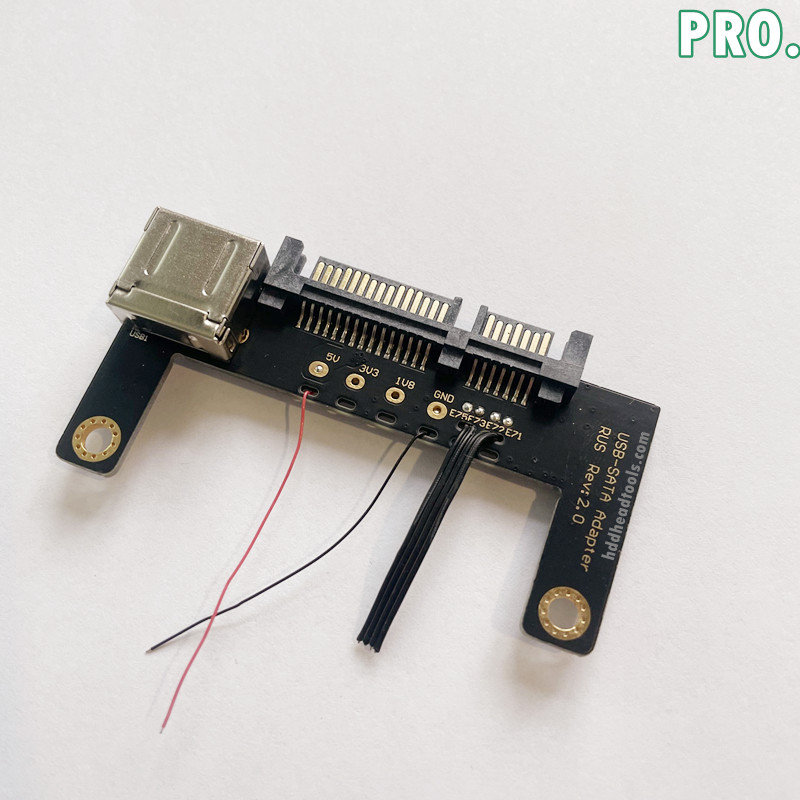
https://www.hddheadtools.com/product/hdd-usb-sata-wiring-pcb-pro/
A tad expensive, but you can also find them on aliexpress - enough, or build your own from scrap PCBs. That way PC3K can easily control the power if required and you don't need the extra mess of USB cables in the way.
https://www.hddheadtools.com/product/hdd-usb-sata-wiring-pcb-pro/
A tad expensive, but you can also find them on aliexpress - enough, or build your own from scrap PCBs. That way PC3K can easily control the power if required and you don't need the extra mess of USB cables in the way.
Who is online
Users browsing this forum: No registered users and 1 guest