Page 1 of 2
Sandisk 20-82-00369-282
Posted: 23.01.18, 13:22
by jerema
I got usb stick with Sandisk 20-82-00369-282 with one chip 32GB
Did anybody know, if this chip is encrypted ?
Re: Sandisk 20-82-00369-282
Posted: 23.01.18, 13:25
by Roman_TS
Most of modern Sandisk controllers does not use encryption. Only XOR.
Re: Sandisk 20-82-00369-282
Posted: 23.01.18, 13:48
by jerema
Ok, thanks Roman, then I will desolder the chip and try to solve with pc3000.
Re: Sandisk 20-82-00369-282
Posted: 25.01.18, 19:29
by jerema
Unfortunately it is a LGA60 chip.
Re: Sandisk 20-82-00369-282
Posted: 26.01.18, 08:13
by Roman_TS
You can read it with TLGA-52 adapter. Additional 8 pins are not critical for chip reading.
Re: Sandisk 20-82-00369-282
Posted: 26.01.18, 10:03
by jerema
Hello Roman,
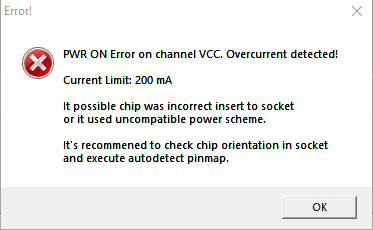
this does not work. There comes a message: PWR ON Error on Channel VCC. ...uncompatible power scheme
Re: Sandisk 20-82-00369-282
Posted: 26.01.18, 14:43
by Roman_TS
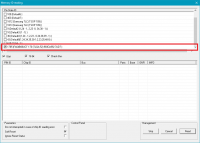
Try to chose power scheme ID=1785 during chip ID reading. Should help.
Re: Sandisk 20-82-00369-282
Posted: 26.01.18, 16:13
by jerema
I can not found this power scheme
Re: Sandisk 20-82-00369-282
Posted: 29.01.18, 08:08
by Roman_TS
Here is it:
Attachments
- ID.png (12.43 KiB) Viewed 25789 times
Re: Sandisk 20-82-00369-282
Posted: 05.04.18, 15:01
by MasterT
I also have an LGA60 Chip H23QFG8PG1MCS Manufacturer SK HYNIX.
I tried to read using power scheme ID=1785 with TLGA-52 adapter, chip is centered, clean contacts.
I get the following error.
Attachments
- error.png (7.72 KiB) Viewed 25445 times
Re: Sandisk 20-82-00369-282
Posted: 05.04.18, 16:28
by AJ2008
Does it display ID correctly, and all looks good, then this error is presented?
I see these symptoms I describe before and could not read in PC3000 reader, I had to use other reader to get dump made, I do not know why this happens, hopefully is some simple solution that Acelab can tell us all

Re: Sandisk 20-82-00369-282
Posted: 06.04.18, 08:43
by Roman_TS
Hello,
A couple of questions:
1. Do you see chip ID in Log?
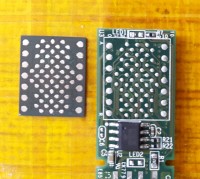
2. Are you sure that your chip LGA-60?
3. Did you turned off all other reading schemes like on my screen?
download/file.php?id=1025&mode=view
Re: Sandisk 20-82-00369-282
Posted: 11.04.18, 11:58
by MasterT
1. I cannot see chip ID.
2. i attached a picture for confirmation.
3. I did exactly as in your picture.
Attachments
- 20180411_135317.jpg (15.92 KiB) Viewed 25278 times
Re: Sandisk 20-82-00369-282
Posted: 14.04.18, 08:25
by MasterT
Most likely chip is dead.
Re: Sandisk 20-82-00369-282
Posted: 20.04.18, 21:45
by Multi-COM
Is this H2JTDG2MBR ? If answer is Yes then its probably not death.