Page 1 of 2
Seagate AFH
Posted: 19.01.19, 09:24
by MasterT
How to adjust the head temperature to recover head damaged hard drives?
https://www.youtube.com/watch?v=KKY1Nj2Uleohttps://www.recoveryforce.com/forums/vi ... f=25&t=479Is it possible on PC3000 ?
Re: Seagate AFH
Posted: 19.01.19, 14:13
by LarrySabo
Here's the version easier to understand for those who don't read Chinese:
https://www.youtube.com/watch?v=23NMtMQK6JI
Re: Seagate AFH
Posted: 20.01.19, 14:26
by DataMedics
It's possible using some Excel-foo and a ZOC script:
https://www.youtube.com/watch?v=W9KbKw57GxI
Re: Seagate AFH
Posted: 20.01.19, 23:43
by Takanashi_Hina
Re: Seagate AFH
Posted: 22.01.19, 11:44
by MasterT
Thank you all for your sugestions.
I hope ACE will implement this in their software.
Re: Seagate AFH
Posted: 22.01.19, 15:26
by DataMedics
MasterT wrote:Source of the post Thank you all for your sugestions.
I hope ACE will implement this in their software.
I'm still not sure how much benefit it is. I've yet to find a case where it's helping. But, I'll keep trying it after I've exhausted most conventional means to see if I can find a case where it's of any real benefit. I had one case where it seemed to read a bit better after adjusting it, but it could have just been a placebo effect too. It's hard to say. I'm still not certain that Dolphin didn't just "break" the drive on purpose by setting those values low enough the head stopped working, then adjusting it back to a normal range...
Maybe someone else has more experience with this.
Re: Seagate AFH
Posted: 24.01.19, 07:48
by Nick_TS
It's a very dangerous procedure for heads. And we haven't seen cases where it was useful.
So I'm sure that it will be implemented in PC-3000 in near future.
Re: Seagate AFH
Posted: 07.02.19, 18:04
by pclab
I had a case a couple of weeks ago, where it was useful. Solved my case.
Re: Seagate AFH
Posted: 11.02.19, 21:29
by DataMedics
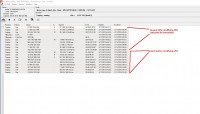
Okay, I can finally confirm that there is definitely some merit to this method. I had a Pharoah drive today that came in. Could get ID but would get instantly stuck busy. After modifying everything in firmware to stabilize it (disable reallocation,etc.) the drive would read but only at around 100-300kb/s max from either head. I boosted both heads by 20, head 0 started working fine and reading at 100Mb/s. Head 1 was still slow (reading around 1-2Mb/s max) until I boosted it by another 20 and now it's reading at around 60Mb/s. So a drive that definitely appeared to need replacement heads is now reading at a good speed and will be done in a couple hours.
It's not just a placebo effect, this definitely has merit. I can confirm that now.

Re: Seagate AFH
Posted: 11.02.19, 21:37
by DataMedics
Here's a picture showing the read speed difference when I made the AFH adjustments:
- AFH Works.jpg (168.36 KiB) Viewed 26010 times
Re: Seagate AFH
Posted: 17.03.19, 20:32
by Amarbir[CDR-Labs]
Well,
I Have Done Several Cases With Success Using This ,I Hope Acelab Implements This Very Usefull Procedure For Seagate Drives
Re: Seagate AFH
Posted: 10.04.19, 23:13
by houman_2h
Dmitriy_TS wrote:Source of the post It's a very dangerous procedure for heads. And we haven't seen cases where it was useful.
So I'm sure that it will be implemented in PC-3000 in near future.
AFH is very useful for head And there is not danger . The head works better and faster without pressing and changing .
Re: Seagate AFH
Posted: 11.04.19, 13:49
by lcoughey
I'd love to see this added to PC3000. It is one of the few features of MRT that I find useful because it makes it simple to do.
Re: Seagate AFH
Posted: 25.10.19, 00:51
by Fraser Corrance
Ace Labs,
Come on guys, this does have value in some situations. It probably is not a good idea on a drive with a really high G-sense error rate but there have been several cases I have had where this is a great way to avoid having to do a head swap.
I have also been doing some research on methods to rebuild damaged Seagate ROMs where this process is extremely useful.
Fraser
Re: Seagate AFH
Posted: 07.12.19, 19:20
by PAKcomputers
I can confirm that this worked on a Rosewood_A5. 2TB, 4heads. imaged heads 0-2 at full speed. Head 3 read up to 180000000 at full speed, then peppered the screen with errors. retry on the same LBA mostly successful, but really slow (2-3K/sec at best).
changed the RHtClr, first by adding 10 with minimal change in speed, then added 20 and am imaging at ~50M/sec with 0 errors
I wrote a script that takes the output of 7>I,1,f,3 and builds a ZOC script for the desired changes
If anyone is interested, send me a message