

Hello,
I have patient Toshiba MK3265GSX.
When power on the drive calibrate slowly, but good drive ID and I can build head map on DE.
When I try to copy data, I have read error (I try on many part of surface).
I changed head with same result
I changed PCBA + FW with same result
I clear Glist but same result
Anyone can help me?
Thanks
MK3265GSX problem
Moderators: Filipp_TS, Garry_TS
Re: MK3265GSX problem
Hello
What error of reading do you get?
have you tried to read surface in all reading modes (UDMA66, UDMA33, with HW retries and etc.)?
What error of reading do you get?
have you tried to read surface in all reading modes (UDMA66, UDMA33, with HW retries and etc.)?

Re: MK3265GSX problem
Hello Misa
Very oftenly, Toshiba drives have problems with bearing. Please check if your drive make any strange noises when it is working. I had a case some time ago, when a Toshiba drive was working well, after you put it upside down or on its sides.
You may also measure the resistance on spindle motor coils on a good drive and compare the values with a bad one. Spindle motor problem is also possible.
Waiting for your reply.
Very oftenly, Toshiba drives have problems with bearing. Please check if your drive make any strange noises when it is working. I had a case some time ago, when a Toshiba drive was working well, after you put it upside down or on its sides.
You may also measure the resistance on spindle motor coils on a good drive and compare the values with a bad one. Spindle motor problem is also possible.
Waiting for your reply.
With best regards
ACE Lab technical support
ts.acelab.eu.com
blog.acelab.eu.com
ACE Lab technical support
ts.acelab.eu.com
blog.acelab.eu.com
Re: MK3265GSX problem
Hello,
I think it's not bearing problem, but I'll try later if no result soon.
Now I can read some sector.
I must start Toshiba Utility for that ("Other SATA")
I can read in all mode (UDMA33, 66 and HW retries) but with many many bad bloc (reading with CRC error) on full surface.
When I restart copy I can read more good sector (green status change)
For exemple I need 10 pass for have 256 good sector and reading slowly ...
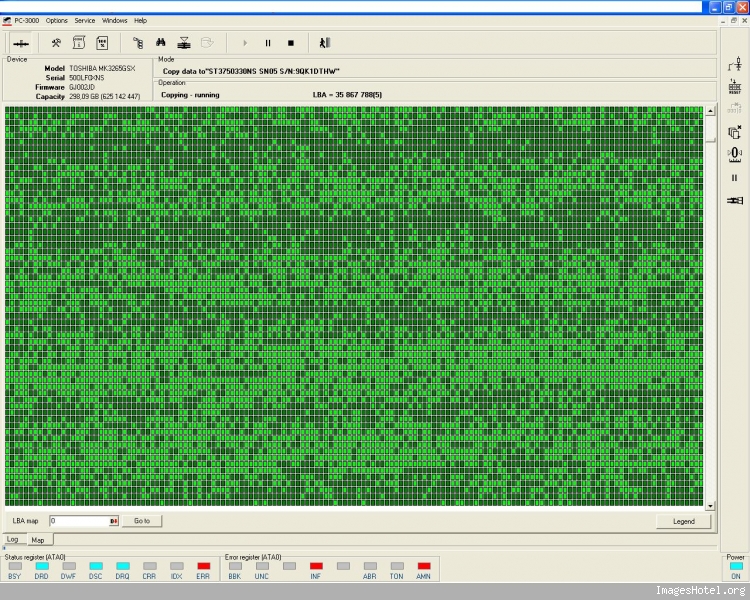
I try with reading retries but need restart scan for good result.
I try with different timeout and delay but always the same result.
Any Idea
Regards,
Misa
I think it's not bearing problem, but I'll try later if no result soon.
Now I can read some sector.
I must start Toshiba Utility for that ("Other SATA")
I can read in all mode (UDMA33, 66 and HW retries) but with many many bad bloc (reading with CRC error) on full surface.
When I restart copy I can read more good sector (green status change)
For exemple I need 10 pass for have 256 good sector and reading slowly ...
I try with reading retries but need restart scan for good result.
I try with different timeout and delay but always the same result.
Any Idea
Regards,
Misa
Re: MK3265GSX problem
Hi,
That's a common issue with some Toshiba drives.
Try to remove soft reset and work with just hard reset to see if it makes any difference.
That's a common issue with some Toshiba drives.
Try to remove soft reset and work with just hard reset to see if it makes any difference.
Re: MK3265GSX problem
Hello and thanks for your help,
I tried to remove soft reset and work just with hard reset but it's worse.
Any idea ?
Regards
I tried to remove soft reset and work just with hard reset but it's worse.
Any idea ?
Regards
Re: MK3265GSX problem
Hi,
Have you increase reading timeout and removed UDMA timeout, so the drive will go to PIO mode?
Have you increase reading timeout and removed UDMA timeout, so the drive will go to PIO mode?
Re: MK3265GSX problem
Clear map of Dark Green sectors and Increase read retries before a second pass.
Also, clear GLIST can help sometimes.
Also, clear GLIST can help sometimes.
Re: MK3265GSX problem
Hello,
Thanks for your help !
I already try to increase timeout (and many other parameters) and clear Glist but never good result.
I realised map from alterate MFT and I can read some important file with many retries !
Regards
Misa
Thanks for your help !
I already try to increase timeout (and many other parameters) and clear Glist but never good result.
I realised map from alterate MFT and I can read some important file with many retries !
Regards
Misa
Who is online
Users browsing this forum: No registered users and 10 guests