Page 1 of 1
How to increase copy speed between drives
Posted: 07.06.18, 11:57
by edbrandt
Hello friends
Copying large amounts of data is a - when it comes to time, and Windows file explorer is certainly not the fastest option. Let's say you need to copy 1 TB from your local PC-3000 system to an external USB drive; which option is best considering elements like speed, ease of use, fail tolerace, logging and flexibility (long file names, odd characters, etc).
I remember using Robocopy some years ago, but do you have any experience and suggestions for better tools?
Thank you
-Espen
Re: How to increase copy speed between drives
Posted: 07.06.18, 13:19
by RevocoTT
Hi Edbrandt,
We use
Roadkil's Unstoppable Copier http://www.roadkil.net/program.php/P29/Unstoppable%20Copier, it's very flexible, small, you can do batch jobs, adjust the speed of the copy, you don't have any issues with long file names, folder depth, etc.
It's a donation app, so if you like it, your free to support them.
Re: How to increase copy speed between drives
Posted: 07.06.18, 15:58
by DataMedics
Doesn't do any major logging other than keeping an on-screen list of files that failed to copy, but a fast reliable one we've been using for years is Fast Copy:
http://www.majorgeeks.com/files/details/fastcopy.htmlI've found that it's especially good at picking up where a copy operation left off previously. Somehow it's really fast at going through and skipping the already copied files.
Re: How to increase copy speed between drives
Posted: 08.06.18, 11:52
by edbrandt
Thanks RevocoTT and DataMedics , I'll have a look at your suggestions.
I waited more than 15 hours for 200GB to copy yesterday.. when transfer speed displays as low as 430 bytes/s it's getting kind of boring

-Espen
Re: How to increase copy speed between drives
Posted: 09.06.18, 07:05
by hdd00
I recommend Fast copy....I use it every day for copy to usb or network and is really fast.
Re: How to increase copy speed between drives
Posted: 20.06.18, 08:48
by edbrandt
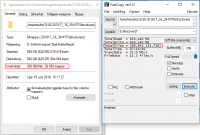
I tried Fast copy, and it seemed to work good (well, not really because this was a USB attached drive).. but I noticed that there was a huge different in number of files/folders displayed comparing Windows Explorer and Fast copy.
The image shows the Windows Properties for a folder, and the Fast copy result after copying the same folder. Anyone know there is such difference?
- explorer-vs-fastcopy.PNG (37.02 KiB) Viewed 20806 times
Thanks
-Espen
Re: How to increase copy speed between drives
Posted: 20.06.18, 13:26
by LarrySabo
In FastCopy, under Options, Main Settings, do you have it set to ignore errors?
Re: How to increase copy speed between drives
Posted: 20.06.18, 14:44
by edbrandt
Yes LarrySabo. Ignore errors is checked.
Re: How to increase copy speed between drives
Posted: 20.06.18, 16:53
by LarrySabo
edbrandt wrote:Source of the post I noticed that there was a huge different in number of files/folders displayed comparing Windows Explorer and Fast copy.
It seems obvious to me that that's why they differ, or am I missing something?
Re: How to increase copy speed between drives
Posted: 20.06.18, 19:38
by DataMedics
edbrandt wrote:Source of the post I tried Fast copy, and it seemed to work good (well, not really because this was a USB attached drive).. but I noticed that there was a huge different in number of files/folders displayed comparing Windows Explorer and Fast copy.
The image shows the Windows Properties for a folder, and the Fast copy result after copying the same folder. Anyone know there is such difference?
explorer-vs-fastcopy.PNG
Thanks
-Espen
You need to run fastcopy as admin (notice that "Elevate" button at the top?). Otherwise, it won't copy hidden/system files or any files you don't have permission to access with your user account. Best to create a shortcut that'll always run it with Admin privileges. I keep it right on my taskbar that way.
Re: How to increase copy speed between drives
Posted: 21.06.18, 12:43
by edbrandt
Thanks LarrySabo and DataMedics, but the issue seems to be the other way around. When cheking the properties of the (source) folder using Windows Explorer, it reported aprox. 350000 files. But when copying data from the very same (source) folder to my destination drive, Fast copy reported to have copied aprox 399000 files.
So Fast copy actually copied 49000 files more than what Windows Explorer showed in the properties for the folder. But it might be Windows didn't count the hidden files.. Seems like a logical explanation

Thanks
Re: How to increase copy speed between drives
Posted: 21.06.18, 22:44
by DataMedics
Yeah, I try not to understand what the heck M$ is doing most the time. Things Windows does never make sense.