Page 1 of 1
how to choose multiple items to del in plist defect edit menu?
Posted: 03.04.16, 21:54
by oldman
how to choose multiple items to del in plist defect edit menu?
Attachments
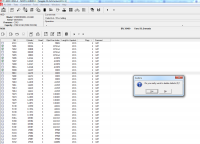
- how-to-edit-plist-to-delete-by-group-instead-of-one-by-one.png (119.62 KiB) Viewed 5172 times
Re: how to choose multiple items to del in plist defect edit menu?
Posted: 04.04.16, 15:43
by Amarbir[CDR-Labs]
Hi,
In The Picture I Can See That Happening .Can You Please Elaborate The Question Once again
Re: how to choose multiple items to del in plist defect edit menu?
Posted: 04.04.16, 16:15
by oldman
Try to delete a group, instead of choosing one by one. such as, use shift-key + page down key, or just use mouse, like most of window application.
But this function does not work for pc-3000 here.
Thanks.
Re: how to choose multiple items to del in plist defect edit menu?
Posted: 04.04.16, 21:08
by Nick_TS
Hello oldman,
oldman wrote:Source of the post how to choose multiple items to del in plist defect edit menu?
Shift+ method doesn't work in defect lists. Method you selected on picture will delete 5 items. It is mentioned on pop window.
Re: how to choose multiple items to del in plist defect edit menu?
Posted: 05.04.16, 00:08
by oldman
Thanks for reply, any easy way for me to delete more instead of one by one to "click" each item?
Re: how to choose multiple items to del in plist defect edit menu?
Posted: 05.04.16, 13:11
by Amarbir[CDR-Labs]
Dmitriy_TS wrote:Source of the post Hello oldman,
oldman wrote:Source of the post how to choose multiple items to del in plist defect edit menu?
Shift+ method doesn't work in defect lists. Method you selected on picture will delete 5 items. It is mentioned on pop window.
But,
The Way Windows Normally Lets You Select Is The Way That Can Be Added To the Tool right Sir