Page 1 of 1

MK3265GSX problem

Posted: 30.08.11, 10:45
by misa
Hello,

I have patient Toshiba MK3265GSX.
When power on the drive calibrate slowly, but good drive ID and I can build head map on DE.
When I try to copy data, I have read error (I try on many part of surface).
I changed head with same result
I changed PCBA + FW with same result
I clear Glist but same result

Anyone can help me?

Thanks
Re: MK3265GSX problem

Posted: 30.08.11, 11:14
by Igor
Hello

What error of reading do you get?
have you tried to read surface in all reading modes (UDMA66, UDMA33, with HW retries and etc.)?

Re: MK3265GSX problem

Posted: 31.08.11, 09:14
by ACE_Admin
Hello Misa

Very oftenly, Toshiba drives have problems with bearing. Please check if your drive make any strange noises when it is working. I had a case some time ago, when a Toshiba drive was working well, after you put it upside down or on its sides.
You may also measure the resistance on spindle motor coils on a good drive and compare the values with a bad one. Spindle motor problem is also possible.

Waiting for your reply.

Re: MK3265GSX problem

Posted: 31.08.11, 16:56
by misa
Hello,

I think it's not bearing problem, but I'll try later if no result soon.

Now I can read some sector.

I must start Toshiba Utility for that ("Other SATA")

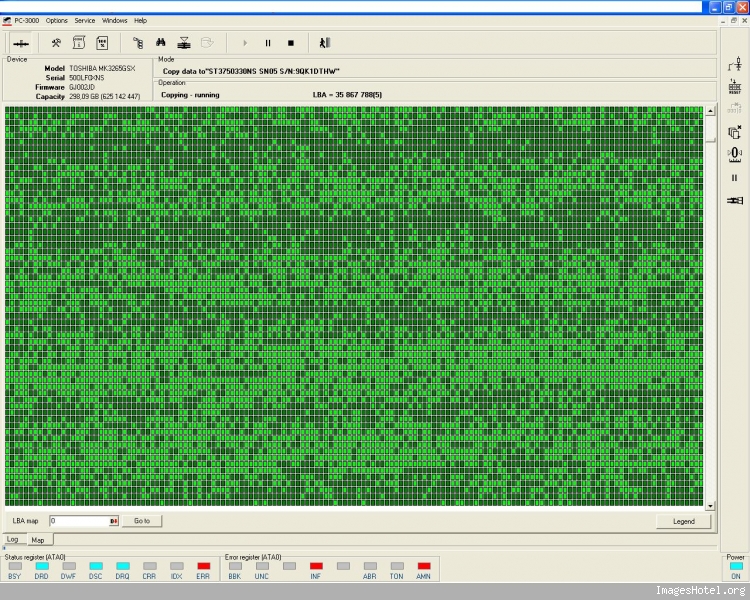
I can read in all mode (UDMA33, 66 and HW retries) but with many many bad bloc (reading with CRC error) on full surface.
When I restart copy I can read more good sector (green status change)
For exemple I need 10 pass for have 256 good sector and reading slowly ...
Image
I try with reading retries but need restart scan for good result.
I try with different timeout and delay but always the same result.

Any Idea

Regards,

Misa

Re: MK3265GSX problem

Posted: 01.09.11, 10:15
by dmarques
Hi,

That's a common issue with some Toshiba drives.
Try to remove soft reset and work with just hard reset to see if it makes any difference.

Re: MK3265GSX problem

Posted: 05.09.11, 10:34
by misa
Hello and thanks for your help,

I tried to remove soft reset and work just with hard reset but it's worse.

Any idea ?

Regards

Re: MK3265GSX problem

Posted: 05.09.11, 16:47
by dmarques
Hi,

Have you increase reading timeout and removed UDMA timeout, so the drive will go to PIO mode?

Re: MK3265GSX problem

Posted: 07.09.11, 13:11
by AJ2008
Clear map of Dark Green sectors and Increase read retries before a second pass.

Also, clear GLIST can help sometimes.

Re: MK3265GSX problem

Posted: 13.09.11, 15:46
by misa
Hello,

Thanks for your help !
I already try to increase timeout (and many other parameters) and clear Glist but never good result.
I realised map from alterate MFT and I can read some important file with many retries !

Regards

Misa